Case study · Deviniti · 2022–2023
Making a Jira test management app ready for regulated teams
I helped move a Jira test management app towards enterprise and regulated customers. The Document View I designed for their sign-offs reached 15% feature adoption within a month.
Context
RTM was live and had a steady base of small customers, but it wasn't profitable. To grow, it had to win medium and large organisations, including regulated industries, where testing must be documented and signed off.
I joined as the product's only designer, at the same time as a new product manager. There was no product research culture yet: no budget for user interviews and no place for research in the process. So I worked with the data we already had. Along the way I advocated for research. From mid-2023 the company had a research budget, and the share of projects that included research grew from zero to about half.
Research without user interviews
I started with a UX audit of the app's flows to find pain points and inconsistencies. Then I combined every source of customer evidence the company already had:
- Support tickets: about 100–150 tickets and feature requests, to find the most common friction.
- Churn survey: dozens of answers from customers who uninstalled the app, showing what was missing.
- Community listening: the Atlassian Community and social media groups for testers and Jira users.
- Competitor data: in Metabase I compared which customer tiers used competing tools and which features enterprise clients were finding there.
- Usage data: in Google Analytics I checked which features people used and the paths they took.
- UX audit of flows
- Support tickets (≈100–150)
- Churn survey (dozens)
- Community listening
- Competitor data (Metabase)
- Usage data (GA)
- Traceability is our edge
- Documents for sign-offled to Document View
- Automation is a must-have
I clustered the evidence into pains, goals and needs, which produced three findings I can share.
What I found and what we did about it
-
Traceability is our edge.
Few Jira add-ons combine requirements and tests in one place, and customers valued not switching tools.
What we decided: Keep traceability at the core and make dependencies visible wherever users review their work.
-
Regulated teams need documents to sign.
Requirements lived in a nested tree with no way to read or export them as one document, so approvals were painful.
What we decided: Design a Document View with PDF export (below).
-
Automation is a must-have.
Competitors offered full test automation support; modern DevOps teams expect it.
What we decided: Added to the roadmap, but technical debt kept it out of reach for now (see trade-offs).
The PM and I prioritised all findings with MoSCoW, weighing customer value against the effort needed to clear technical debt in the backend.
Document View: designed for how approvers actually work
The people who sign off requirements in regulated industries wanted to read them as one continuous document. Many of them still worked with paper, so the document also had to be ready to print.
I designed the Document View around three decisions:
- One continuous document instead of a click-through tree. Approvers read the whole project top to bottom, while the folder hierarchy stays visible as structure.
- All dependencies on one page. Each requirement shows its linked issues, attachments, test cases and test plans, so an approver sees full traceability without opening anything else.
- Print-ready PDF export, so the document fits paper-based sign-off processes.
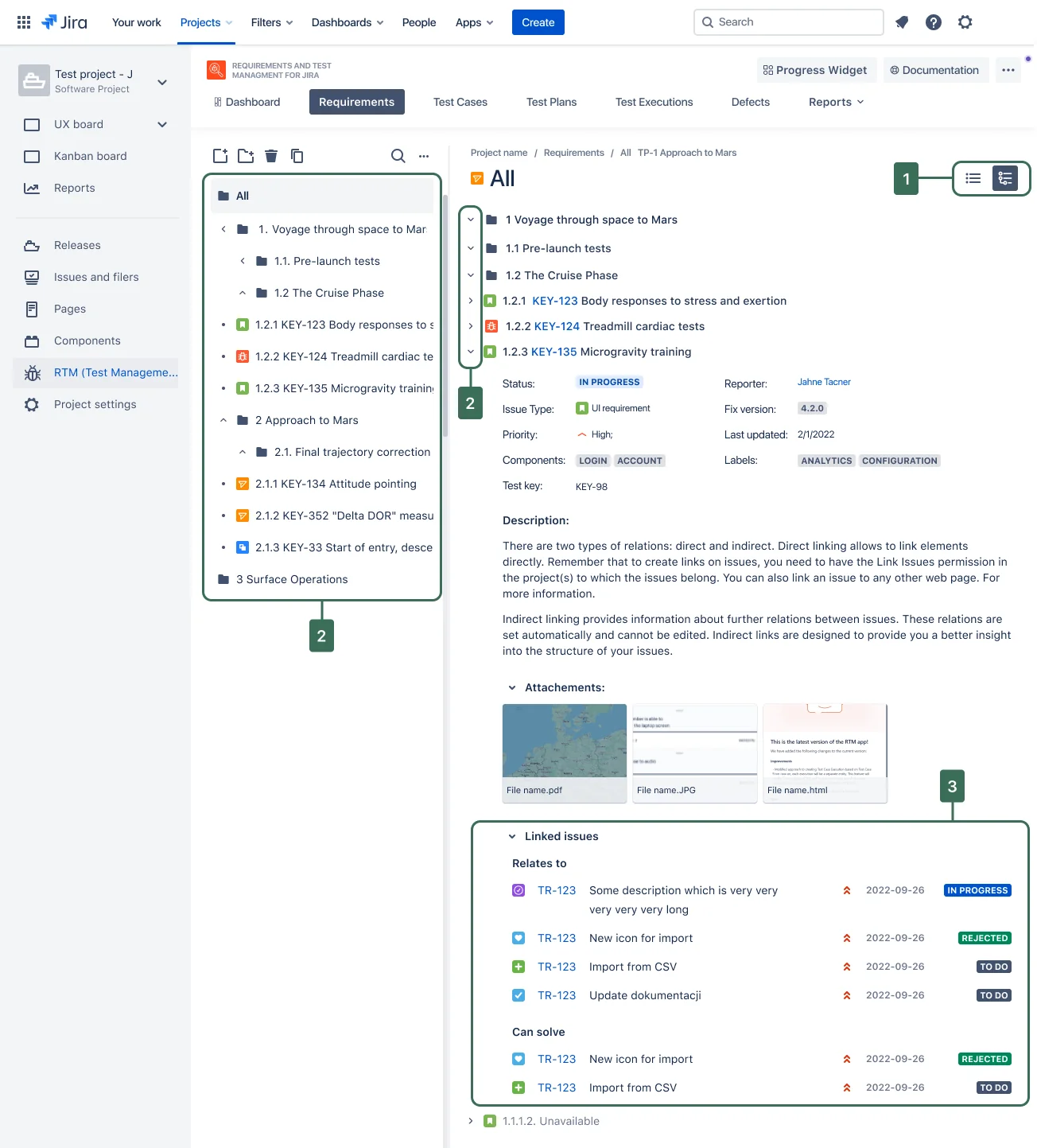
- 1
Users can switch from the default view to Document View. It helps them review existing requirements without switching between issues to see their details.
- 2
Dependencies between folders are visible. Each item can be collapsed, which makes the document easier to browse.
- 3
Linked issues are easy to review.
Without budget for user testing, I validated the design with the support team, who knew customers' requests best, and with quick corridor tests. Both confirmed the approach, so the design went ahead without changes.
-
15%
of all users adopted Document View within a month of release
Measured in GA4, without segmentation
Result: 15% of all users adopted the feature within a month of release (measured in GA4, without segmentation). That is a strong number for a feature built for a specific group of users, not for everyone.
Modernising the UI during a backend overhaul
A major backend rebuild was an opportunity to fix the interface too. I redesigned the app's views on the new Atlassian Design System, so RTM looked and behaved like a native part of Jira.
We also introduced flexible search for tables such as the lists of test cases and requirements, so users could run more advanced operations on their data. I chose which filters to add based on what customers asked for in support tickets.
I worked in Scrum with frequent developer syncs. For each feature I moved from low-fidelity wireframes to high-fidelity designs to a clickable prototype for handover.
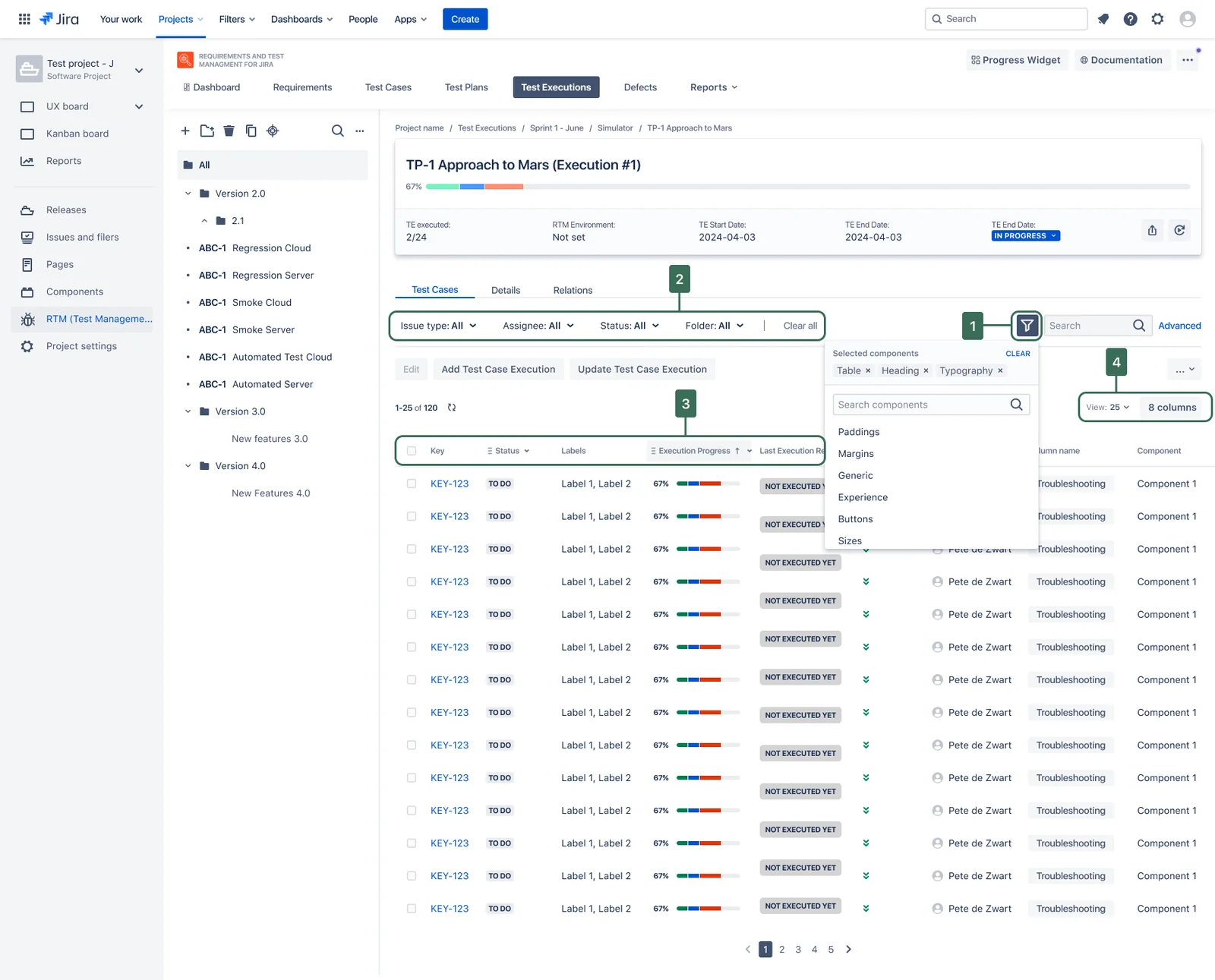
- 1
Users can flexibly add and remove the fields they filter by.
- 2
Selected filters: users can freely choose the values of each field.
- 3
Table columns can be sorted.
- 4
Users can decide how many columns are visible and how many items appear on one page of the table.
The trade-off we couldn't avoid
Technical debt made many features hard or impossible to build. Test automation was the biggest casualty: it reached the product only after competitors had offered it for a long time.
What happened next
In April 2023 I moved to another project. The automation finding was already on the roadmap, though without a date. Later the team added automated testing and PDF exports for test cases and test executions, in line with the research I left behind.
What I'd do differently
I would push harder and earlier to start discovery for test automation: deepen our understanding of the need and write down requirements, even while technical debt blocked the build. The need was large, competitors were ahead, and the product badly lacked modern features. Starting the design work early would have shortened the path once the backend was ready.